- Stack
- Higgsfield (Seedream 5 Pro, Seedance 2.5, Genjutsu) + ElevenLabs v4
- Workflow
- 6 steps · 5 prompts
- Models
- Seedream 5 Pro Seedance 2.5 Genjutsu ElevenLabs v4
- Keyword
- Comment BIKE under the reel ↗
- Price
- Free
What you need
The original reel (download it) · your character sheet · Higgsfield for images and video · ElevenLabs for the voices. Work in 480p drafts, go 1080p only on the takes you keep.
06 stepsThe workflow
- 01
Cut the reference into shots
Watch the reel frame by frame and note every cut. This one has only two shots: 0–6 s on the parked bike, 6–15 s riding in a tunnel. Note when each line is said.
- 02
Make a character sheet in the costume
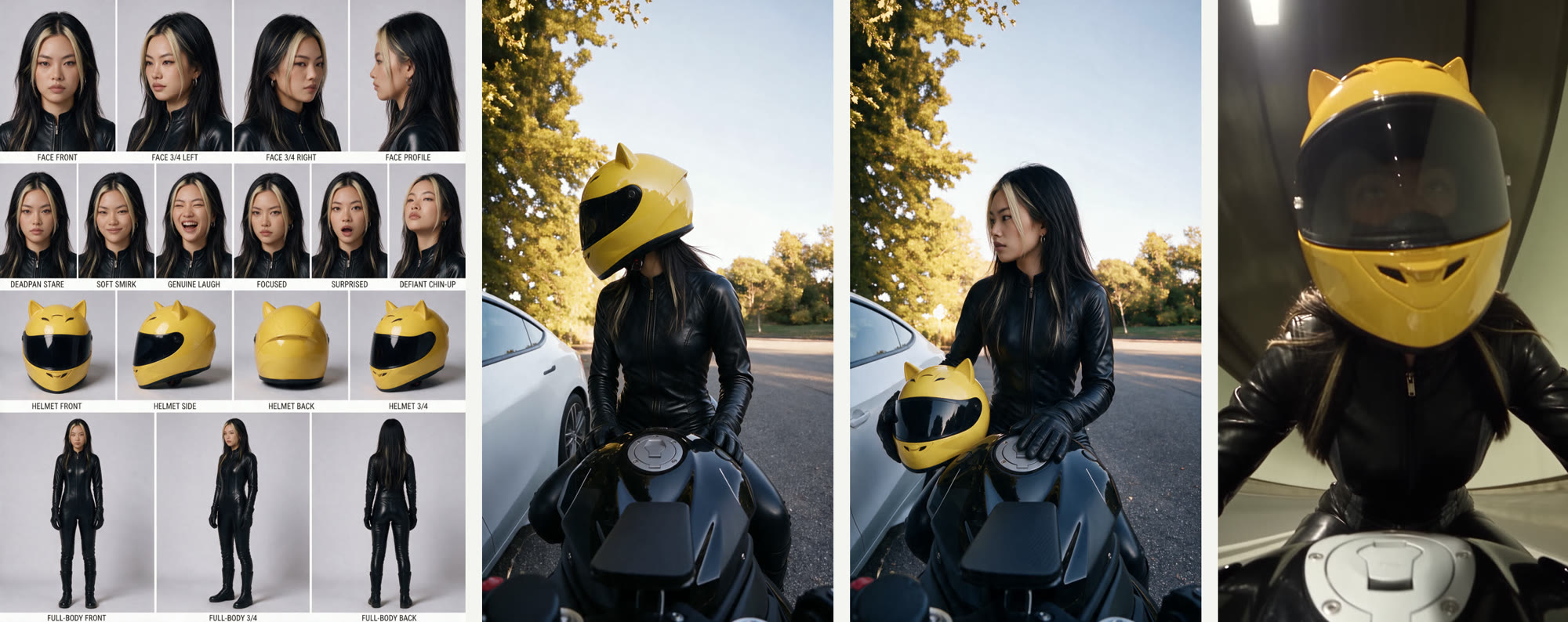
Seedream 5 Pro with your character sheet + one outfit image. Ask for faces, expressions, full body, and the helmet shown alone as a separate object, so the model never mixes it with the face.
- 03
Build a start frame and an end frame
Screenshot the first and last frame of the shot. In Seedream, replace the person with your character in exactly the same pose. Same camera, same car, same sun: the background stays real.
- 04
Animate with Seedance 2.5 (omni reference)
Start image + end image + the original shot as video reference + character sheet. The video gives the timing and gestures, the two frames lock the identity. 480p draft first, then finalize in 1080p from the draft.
- 05
Hidden face? Use Genjutsu
When the face stays behind a visor (the tunnel shot), Higgsfield Genjutsu (replace object) swaps the rider directly inside the original video. Perfect motion, no re-acting.
- 06
Voices and edit
ElevenLabs v4 with audio tags, 4 takes per line, keep the best. Place each line where it was in the original, copy the original captions (same serif, same spot), add music.
!Avoid this
Don't name a famous character in your prompts: the IP filter blocks it. Describe it instead ("yellow helmet with two small ears"). Don't use Genjutsu for a face reveal: you will still see the original person. Add "no text, no subtitles": a video reference copies burned-in captions.
READY TO COPY · SEEDREAM 5 PRO + SEEDANCE 2.5 + ELEVENLABS V4
The prompts
Replace the words in [BRACKETS] with your own character, costume and scene.
Character sheet
Character reference sheet, same layout as the FIRST reference image (light grey studio background, labeled panels). Same person as the first reference: exact same face and [HAIR]. NEW OUTFIT: [COSTUME, e.g. fitted matte black leather motorcycle catsuit, black gloves, black boots] from the SECOND reference image. She never wears the helmet in this sheet.
PANELS: FACE FRONT, FACE 3/4 LEFT, FACE 3/4 RIGHT, FACE PROFILE, 6 expressions; a row with the [HELMET] shown ALONE as an object: HELMET FRONT, SIDE, BACK, 3/4; FULL-BODY FRONT, 3/4, BACK.
AVOID: no person wearing the helmet, no logos, no misspelled labels.
Start and end frames
Edit the FIRST image: replace the person with the character from the SECOND image (character sheet), in exactly the same pose, position and size in the frame. [WHAT CHANGES: e.g. helmet on, head turned toward the car / helmet off, hair falling naturally, calm side glance at the car]. Keep everything else exactly identical: framing, camera, vehicle, background, sunlight and color grade. Photorealistic.
AVOID: no text, no glasses, no windswept hair.
The shot
Static action camera mounted low on the front of the motorcycle, exactly like the reference video: same framing, wide lens, no camera movement. The character from the start frame copies the timing and gestures of the person in the reference video: [ACTION, e.g. turns toward the car as if talking, unbuckles the strap, pulls the helmet straight up and off]. Her hair drops down naturally under gravity, no wind. She ends exactly on the end frame. Her face is the one from the character sheet. The helmet keeps the same size and shape the whole time. Real action-camera footage look.
AVOID: no text, no subtitles, no captions, no floating hair, no camera movement, no extra people.
Hidden-face shot
Replace the rider with the character from the reference sheet, wearing [COSTUME] and the [HELMET] with its dark visor down. No backpack straps, no glasses. Keep the same riding movements, camera, framing, lights and color grade as the source video.
Voices
[teasing] Can I get your number?
[smug] Take off the helmet.
[flatly] No.
@LEARNWITHKLOE · TUTORIAL · Higgsfield (Seedream 5 Pro, Seedance 2.5, Genjutsu) + ElevenLabs v4